Generic GIT
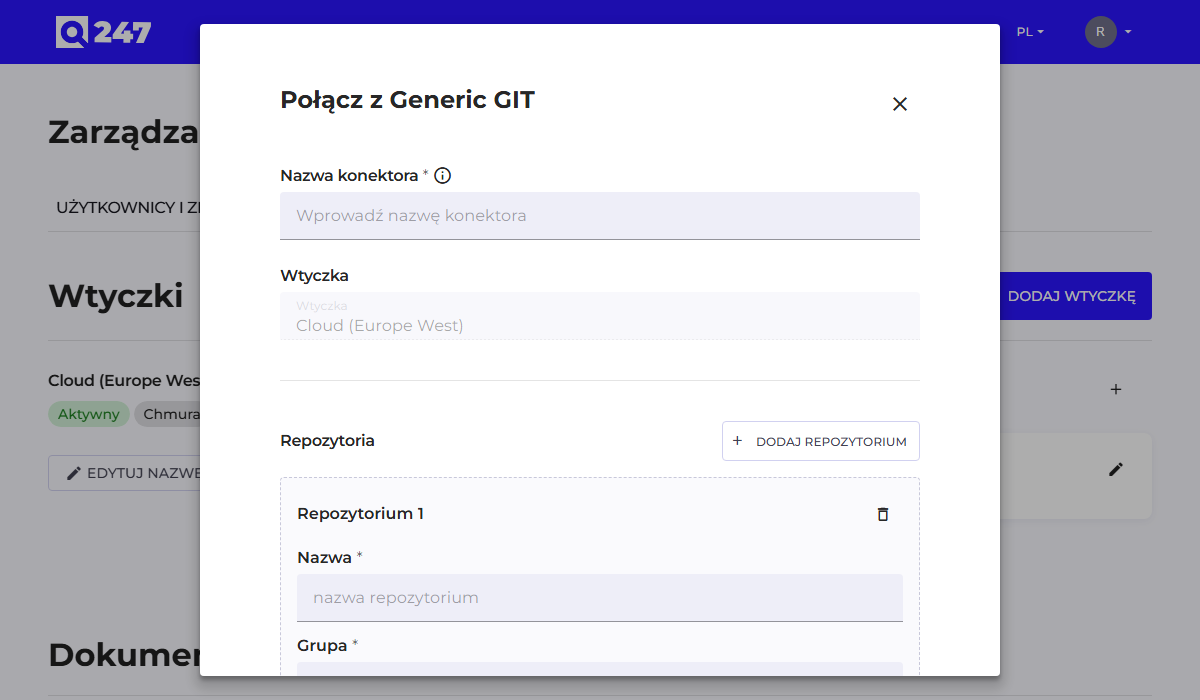
The only connector type that does not connect via an API. Instead of a server address and a token, the form accepts a manually added list of repositories. Useful for any Git-compatible repository not supported by any of the other types.
Each repository is added with the "Add repository" button and described with three fields:
| Field | What to enter | Example |
|---|---|---|
| Name | the repository's name, later visible on the Sources list | payments-api |
| Group | usually the name of the project or product the repository belongs to | payments-platform |
| URL | the full address, including login credentials if required | https://user:token@git.company.com/payments-api.git |
This connector has no separate fields for username and token. If the repository requires authentication, the credentials must be placed in the address, in the form https://user:token@host/repo.git. Use a service account with read-only permission for this, not a personal account.
For the same reason, the $$VARIABLE_NAME notation available in the other connectors (Credentials from environment variables) does not work here. The token therefore reaches Q247 as part of the address, which should be taken into account when choosing the account and the scope of its permissions.
The Group field goes into the repository metadata sent to Q247 and helps identify relationships when the Sources list has dozens of entries.
Network access to the repository must be public or open to the IP address the given plugin runs from. For Cloud Plugin this means an address on the Q247 side, for Private Plugin an address in the Customer's infrastructure.
See also
- Connectors: the remaining, automated connector types
- Running code analysis: what to do after saving the connector