Azure Boards
The Azure Boards integration lets Q247 measure work done on work items. Comments, descriptions and status changes are analyzed the same way as Jira tickets, and the calorie result is added to the author's total in the Documentation type.
Azure Boards appears as a source type on the Sources list, identified by an Area Path prefix.
The "Azure DevOps" integration card is shared by Azure Boards and Azure Wiki. If one of these sources is already connected, the other is enabled by checking an additional box in the data scope, without re-entering credentials.
The data path to Q247
The Enterprise Plugin periodically polls the Azure DevOps REST API, reads work items from the selected Team Projects, and analyzes them locally. Only the calorie result reaches Q247.
This integration works exclusively through polling, so it requires no inbound connection to the plugin and no webhook configuration on the Azure DevOps side.
Prerequisites
| Requirement | Details |
|---|---|
| Azure DevOps version | Azure DevOps Server 2022, on-premise installation |
| Token | a Personal Access Token with read-only permissions |
| Account access | the account the token was created on has to see every Team Project that is to be analyzed |
Required token scopes: Work Items (Read), Wiki (Read), Code (Read), Identity (Read), Project and Team (Read).
A token without this permission passes authentication, but the plugin cannot fetch the project list, so it fetches nothing at all. The plugin recognizes this case and reports the missing scope specifically.
Step-by-step setup
1. The integration card in Configuration
Manage Organization, Configuration tab, Documentation section, the Azure DevOps card.
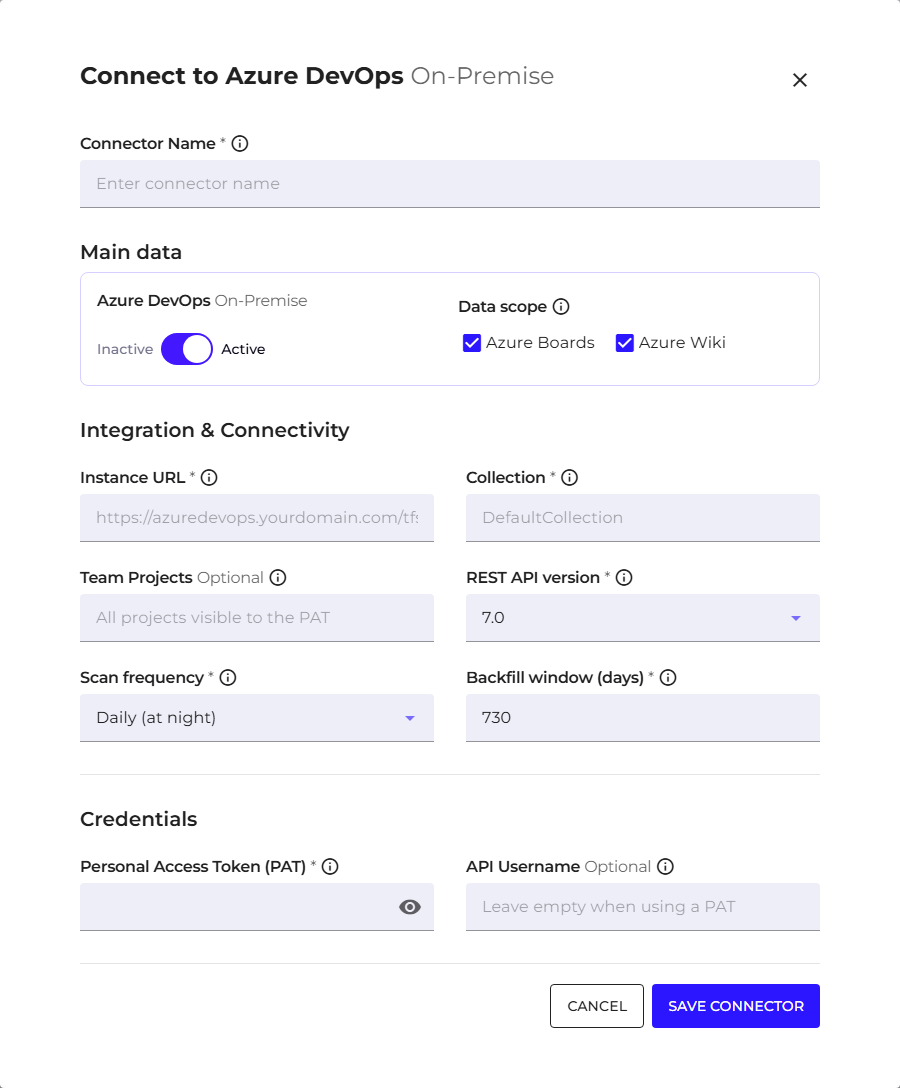
| Field | What to enter |
|---|---|
| Connector Name | your own name for the connection, to recognize it on the list |
| Data scope | check Azure Boards. Saving requires at least one scope; with none selected the message "Enable at least one of Azure Boards / Azure Wiki." appears |
| Instance URL | the HTTPS address of the Azure DevOps server, together with the IIS virtual directory if one is used (for example /tfs), without the collection name |
| Collection | the name of the Azure DevOps collection |
| Team Projects | the list of Team Projects to fetch. An empty field means every project visible to the token |
| REST API version | for Azure DevOps Server 2022 the correct version is 7.0. Use version 6.0 only for older servers |
| Scan frequency | daily at night, or hourly |
| Backfill window (days) | how far back the first run reaches. The default is 730 days, that is two years |
| Personal Access Token (PAT) | a token with the scopes listed above |
Leave the username field empty when authenticating with a token. Azure DevOps ignores that half of the login data anyway.
The token field also accepts the name of an environment variable with the $$ prefix, on the same principle as Connectors. The variable has to exist on the plugin host.
Subsequent runs fetch only increments.
2. Assigning the source to a project
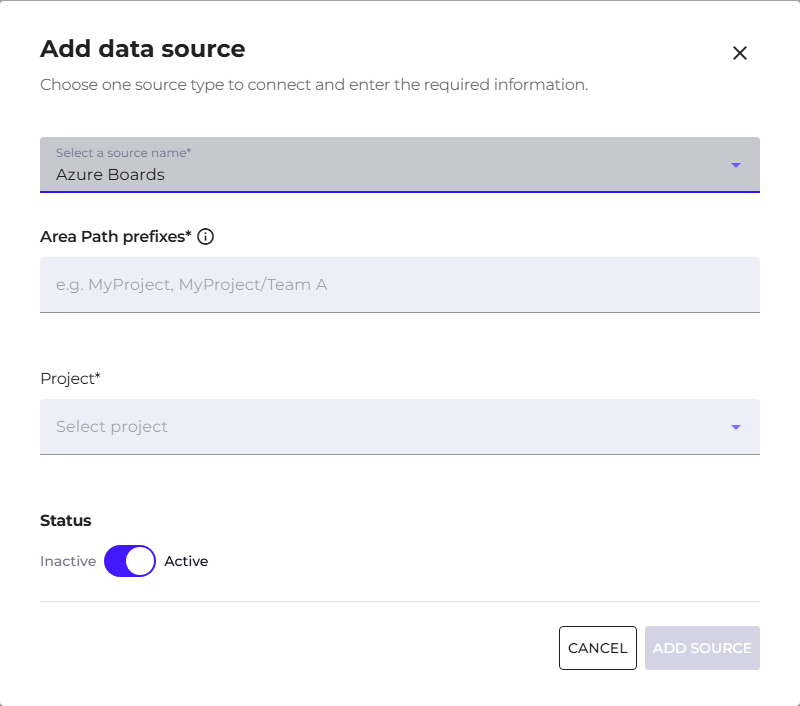
Manage Organization, Sources tab, the add data source button. In the "Select a source name" field point at Azure Boards, and in the Area Path prefixes field give the areas whose work is to flow into this project.
A prefix is the name of a Team Project, optionally with area levels, for example MyProject or MyProject/Team A. You can give several prefixes at once.
Work from sub-areas flows into the parent project, so the prefix MyProject also covers MyProject/Team A and everything below it. Work items outside the indicated areas do not enter the project.
Identity mapping
The author of a work item is recognized exclusively by their real email address from Azure DevOps. Q247 does not create substitute addresses for accounts without an email, so the work of a person without an address will not be assigned to any participant.
Discrepancies between the address in Azure DevOps and the account in Q247 are resolved through merging accounts and aliases.
Where these Calories are visible
Calories from Azure Boards enter the existing Documentation type, and through it the Total type. They never enter the Coding type.
They are therefore visible everywhere the Calories Type selector works: on charts, in participant tables and in the heatmap, with no new views. In the chart details, a single increment is described as Work on work item {id}, with a clickable link to Azure DevOps.
Scope of processed data
| Item | State |
|---|---|
| Work items and their comments | analyzed |
| Test cases (Test Plans) | skipped, generate no Calories |
| Worklogs | out of scope for the first version |
| Pull request comments | out of scope for the first version |
| Azure DevOps Services (cloud version) | unsupported, the integration works only with an on-premise installation |
Deleting a work item in Azure DevOps does not take back Calories credited earlier for work on it. Two parallel connections pointing at the same instance also do not duplicate the result.
See also
- Azure Wiki: the second scope of the same integration card
- Azure DevOps: the code repository connector, a separate connection and a separate token scope
- Sources: the list of all sources and their project assignment
- Calories Type: the split into Coding and Documentation