DORA Metrics
The "DORA metrics" section in Manage Organization → Configuration sets which deployments Q247 treats as production and as repairs, and from which moment it counts lead time for changes. A person with the Admin role can change it. The settings apply to the whole organization, and a single project can override three of them (→ Project settings).
The section appears when the organization has a GitLab, GitHub, Azure DevOps or Bitbucket Cloud connector from which Q247 collects CI/CD deployments. The metrics require the latest version of the Enterprise Plugin (2.8.7). The metrics and tiers themselves are described on the DORA Metrics page.
We recommend changing the DORA metrics settings outside working hours. Recalculating the results after a change can take up to 2 hours. After a change to the production environments or the rollback and hotfix patterns, users do not see DORA metrics until the recalculation finishes, and after the other changes they still see the previous results. → Effects of changing the settings
Turning the metrics on
The "DORA metrics for this organization" switch, with the labels "Enable" and "Disable", decides whether the DORA Metrics card and the DORA columns appear in the organization. Deployments are collected regardless of it, and the other settings of the section can be prepared before the metrics are turned on.
Production environments
The "Production environments" field is required and has no default value. It accepts patterns of the environment names under which the CI/CD system records deployments, for example production or prd-*. Letter case does not matter. A deployment to an environment whose name matches a pattern counts as a production deployment.
While the field is empty, the section shows the hint "No production environments configured yet. Until you add at least one pattern, the feature collects deployments but computes nothing.", and the DORA Metrics card shows "Not configured".
Repair deployments
A repair deployment ends a failure, so Change failure rate and Time to restore depend on it. Q247 recognizes repair deployments by three optional settings:
| Field | Matched against | Rules |
|---|---|---|
| "Rollback jobs and branches" | the CI/CD job name and the branch name | the pattern must match the whole value, so a fragment of a name is wrapped in asterisks, for example *rollback* |
| "Hotfix jobs and branches" | the CI/CD job name and the branch name | as above; the same pattern cannot be on the rollback list at the same time |
| "Repair patterns in commits and pull requests" | commits and pull requests | substring or regular expression mode, each pattern turned on separately, up to 100 patterns of 200 characters |
The "Try a commit message" preview shows whether a sample commit message matches the repair patterns.
Without rollback and hotfix patterns, Q247 cannot recognize most failures. The Change failure rate tile then warns in its tooltip that the result may be understated (→ Change failure rate).
Failure linking window
The "Failure linking window" field has the description "How far back a repair deployment looks for the deployment that caused the failure." The default window is 48 hours. The value is entered in minutes, hours or days, from 1 minute to 3650 days.
Start of lead time for changes
The "Set start for Lead time for changes" field sets the moment from which Lead time for changes is counted. It has three modes:
| Mode | Start of a change |
|---|---|
| "Earliest signal" (default) | the earlier of two moments: the author date of the first commit of the change or the first entry of the linked ticket into the work statuses; when the moments are equal, the commit counts |
| "First commit" | the author date of the first commit of the change |
| "Ticket status change" | the first entry of the linked ticket into the work statuses; when the change has no ticket or the ticket never entered them, the first commit |
A moment later than the deployment itself is not taken into account.
Q247 takes over the ticket work statuses from Flow Metrics. It uses the first of the following settings that is defined:
- Cycle Time start, with statuses or with a category;
- Lead Time start in the Commitment point variant;
- the "In Progress" category.
At each step, a Flow Metrics override in a project takes precedence over the organization setting. The "In Progress" category therefore applies only when neither the organization nor the project has any of these settings. The Ticket creation variant of Lead Time start is not taken over.
Effects of changing the settings
No change in this section requires fetching the deployments from the CI/CD systems again. Q247 recalculates the results from the data it already has. The recalculation can take up to 2 hours.
| Change | Effect |
|---|---|
| Production environments or rollback and hotfix patterns, also in a project override | Q247 re-evaluates all stored deployments. Until the recalculation finishes, the DORA Metrics card shows "Recalculating". |
| Repair patterns in commits and pull requests | Q247 matches the commits and pull requests again. |
| Failure linking window | Q247 links the failures to the deployments that caused them again. |
| Start of lead time for changes, including a change of the boundaries in Flow Metrics that it uses | Q247 recalculates Lead time for changes. |
With the last three changes, the card does not show "Recalculating", so the new results appear without notice.
Project settings
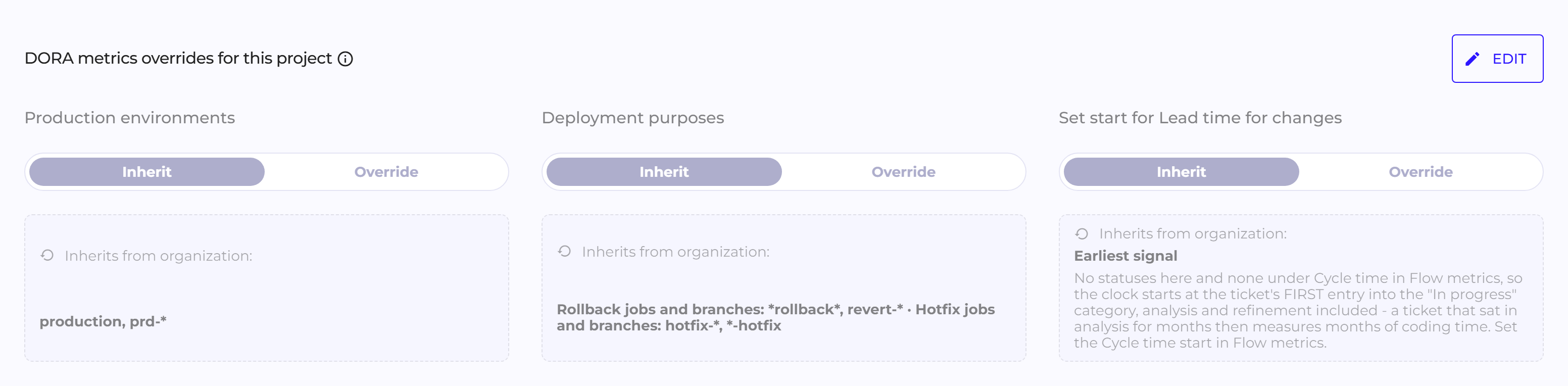
A project overrides only three organization settings: production environments, deployment purposes (rollback and hotfix patterns) and the start of lead time for changes. An overridden value replaces the whole organization value in the project, but only for that one setting. The failure linking window and the repair patterns in commits and pull requests are set only at the organization tier, in this section. The overrides are in the "DORA metrics" tab of the project (→ Projects).
See also
- DORA Metrics: the four metrics, tiers and the card
- CI/CD deployments: collecting deployments, platforms, plugin version
- Flow Metrics: the ticket statuses used by the start of lead time for changes