BitBucket
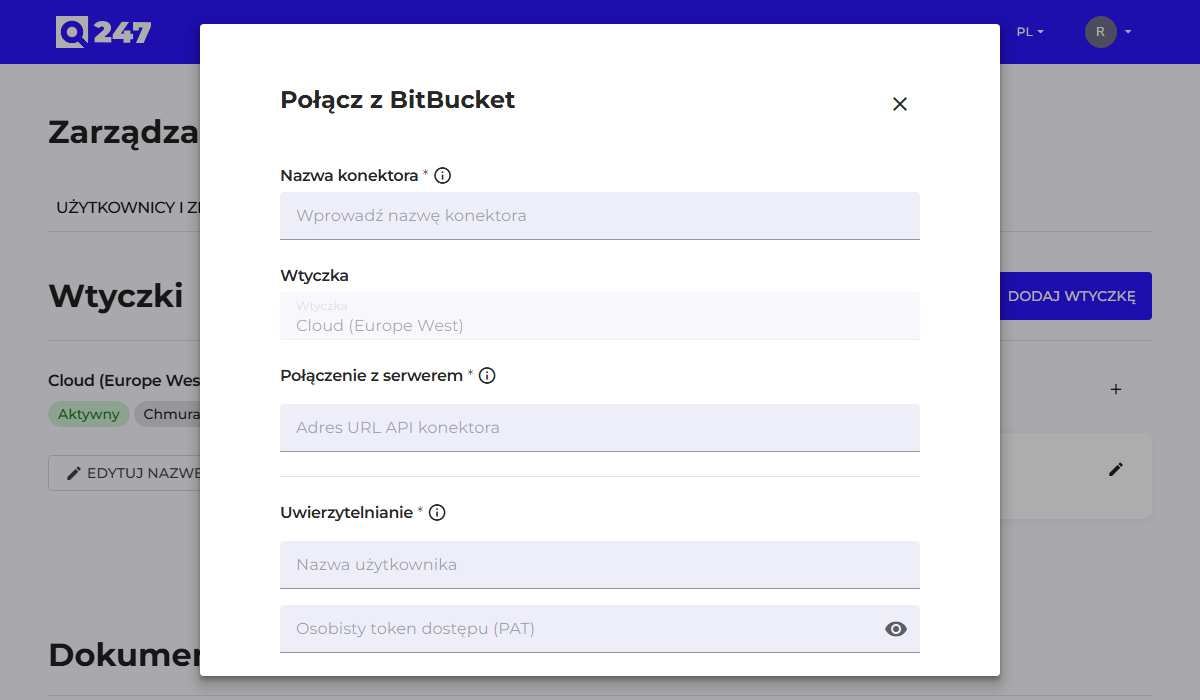
Standard connector form, described in general in Connectors. Both Bitbucket Cloud and Bitbucket Data Center and Server are supported.
| Field | What to enter | Example |
|---|---|---|
| Connector API URL | the instance's API address | https://bitbucket.company.com/rest/api/1.0 |
| Username | the service account's login, in Bitbucket Cloud the e-mail address of the Atlassian account | q247-service |
| Personal access token | a token with read permission, in Bitbucket Cloud the Bitbucket API token described below | $$BITBUCKET_TOKEN |
Instead of entering the login and token directly, you can point to environment variables on the plugin host, using the notation $$BITBUCKET_USER and $$BITBUCKET_TOKEN. How this works and the conditions for it are described in Connectors.
The service account needs read permission for both projects and repositories. Permission at the repository level alone is enough to establish a connection, but the connector will skip repositories from projects the account does not have access to. The symptom is an incomplete list with an Operational status.
In Bitbucket Data Center, the token is generated in the user profile, in the Personal access tokens section, with Read permission for projects and repositories.
To recognize protected branches on pull requests, the token in Data Center needs repository or project administrator permission. Without it the plugin writes a warning to the log and keeps collecting pull requests, without the protection information for the target branch.
In Bitbucket Cloud the connector connects with a Bitbucket API token. In the "Username" field you enter the e-mail address of the Atlassian account, and in the "Personal access token" field an API token with read access to repositories (in the plugin documentation the read:repository:bitbucket scope) and with repository administrator permission, needed to read branch protection rules. Bitbucket app passwords are not accepted.
When the connector API URL leads to bitbucket.org, the form shows three additional fields. All of them are required:
| Field | What to enter |
|---|---|
| Bitbucket Workspace | the Bitbucket Cloud workspace the connector fetches repositories from |
| Atlassian Organization ID | the identifier of the Atlassian organization |
| Atlassian API key | the API key of the Atlassian organization administrator |
The Atlassian organization ID and API key form a separate credential, different from the Bitbucket API token in the "Personal access token" field. The plugin uses it only to determine the e-mail addresses of pull request reviewers, because the Bitbucket Cloud API does not return the e-mail addresses of other users.
Q247 collects the history of CI/CD deployments from Bitbucket Pipelines only from Bitbucket Cloud. For this the Bitbucket API token additionally needs Pipelines read access (in Atlassian documentation the read:pipeline:bitbucket scope), and deployments are read from the workspace given in the "Bitbucket Workspace" field.
See also
- Connectors: the common form, token permissions, statuses
- Running code analysis: what to do after saving the connector
- CI/CD deployments: deployment history from Bitbucket Pipelines and plugin requirements