AI Assistant
The AI Assistant is a panel with an automatic project analysis, described in natural language. It appears only on the Project page. It is not present on Overview, Teams, Team, or Participant.

A blue, round button in the bottom right corner opens the panel. A dot next to the button shows the state: orange while the analysis is still running, green when the result is ready to read. Clicking the button again (or the X icon in the panel header) closes the panel. You can drag the panel by its left or top edge, or by a corner, to resize it.
Analysis in progress
Right after opening, if the result is not ready yet, the panel shows a spinner with the text "Analyzing your project..." and a note that it may take up to 30 seconds. It then explains that you can safely close the window, because the green indicator next to the button, that is the dot described above, will let you know when the response is ready. The analysis runs in the background, so closing the panel does not interrupt it, and you can come back to it later. A previously computed answer is remembered for a few hours, and as long as it is still current, reopening the panel without changing the project shows it immediately, without waiting again.
Analysis result
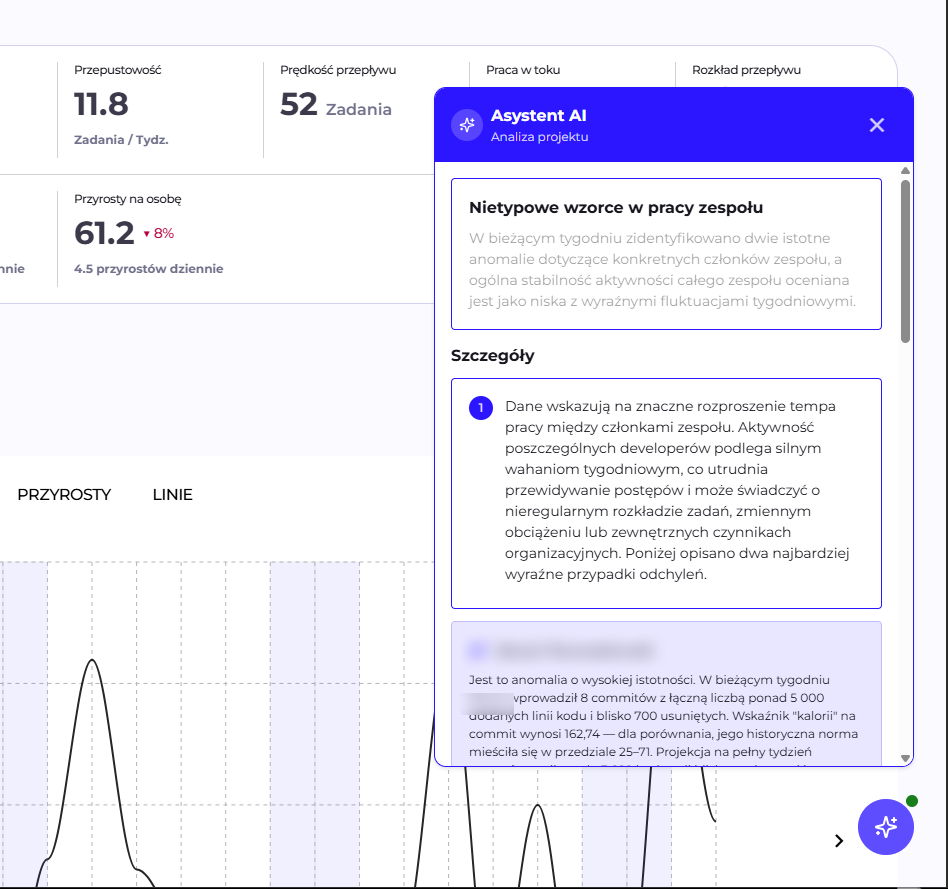
A ready answer may include, depending on what the Assistant considers relevant for the given project:
- A summary card: a short title and description at the top of the panel, in a blue box.
- A "Details" section: numbered cards, each with its own title and content, expanding on the summary.
- Additional cards (e.g. "Conclusions", "Recommendations") on a highlighted background. Their number and names are not fixed, they depend on the content the Assistant considered worth showing for this particular project. The content of these cards can be plain text, a bulleted list, or a numbered list.
- A small, italic footer at the bottom of the panel.
The answer is always in the language currently selected in the application interface (the EN/PL switch in the top bar).
Example
A shortened example of a real answer:
Summary card: "Unusual patterns in the team's work": "This week, two significant anomalies were identified concerning specific team members, and the overall stability of the whole team's activity is rated as low, with clear weekly fluctuations."
Details: three numbered cards, each dedicated to one person:
- Anna Kowalska: a high-significance anomaly. This week, 8 commits, over 5000 added lines of code, a calories-per-commit ratio of 162.74 against a historical norm of 25-71. The card lists possible reasons (e.g. finishing a large feature, merging a long-lived branch) and notes that a high score does not necessarily mean a problem.
- Piotr Nowicki: an irregular, cyclical activity pattern ("high-low-high") over consecutive weeks, with a large standard deviation from the average. The card lists possible reasons (vacation, non-coding work, a change in task context).
- Marta Wiśniewska: no activity after a week of presence in the data, flagged as a signal worth checking, with possible reasons (vacation, project change, onboarding).
Additional "Recommendations" card: a list of four specific suggestions, e.g. "verify the nature of Anna's current commits", "track Piotr's pattern over the next 2-3 weeks", "confirm Marta's status".
Footer: "Analysis based on data from the last 4 weeks, as of the current week. Current week data is partial and based on projections through the end of the working week."
No data
If the account does not yet have any analysis configured for this project, once loading finishes the panel shows a robot icon and the text "No data" instead of a result. The button that opens the panel is visible regardless of whether an analysis has been configured for the given account. Its presence therefore does not guarantee a ready answer.
Language model and data scope
The Assistant uses a language model, which has three deployment variants: the Client's own model in a public cloud, the Client's own model in its network, and a model provided by Q247. The choice affects network rules, cost, and the data processing agreement, and the details of each variant are described in Language model in Integrations.
Prompts and aggregated project data from the last four weeks reach the model, including the first names, last names, and email addresses of team members. The source code of repositories is not passed. The full scope, together with the retention rules, is described in Security and data scope.
A user sees only the analyses of projects they have access to in Q247, in accordance with Permissions.
See also
- Project: the only view where the AI Assistant appears
- Language model: deployment variants and data scope
- AI Adoption: the second AI feature, with its own deployment requirements
- Permissions: who sees the analysis of which project