Version v2.8.0

Version 2.8.0 adds a new data layer to Q247: deployment data. Q247 uses it to calculate DORA metrics: deployment frequency, lead time for changes, change failure rate, and time to restore. The results are visible on the project page and on the Overview, including the Projects table.
The new Smart Account Management feature suggests to administrators which accounts from different sources to merge as aliases and which to give a new status. Suggestions can also be applied automatically.
Enterprise Plugin 2.8.7 running as a system service resumes work on its own after a crash. It also works behind a reverse proxy and optimizes when repositories are fetched, which reduces network traffic.
Below you will find a detailed description of the most important changes.
New Features
DORA metrics
Q247 measures four DORA metrics: deployment frequency, lead time for changes, change failure rate, and time to restore. Each metric gets an Elite, High, Medium or Low tier, based on thresholds derived from the DORA 2024 report.
The DORA card is on the project page and on the Overview. It shows the stages of change delivery and four tiles with the tier and the change compared with the previous period. When expanded, the card also shows a chart of deployments over consecutive days and a list of recent deployments.
The Projects table on the Overview has new DORA columns. Lead time for changes is visible by default. You turn on the other metrics in the column picker.
Enterprise Plugin reads deployment data through SCM connectors, from the CI/CD systems in GitLab, GitHub (including Enterprise Server), Azure DevOps (including Server) and Bitbucket Cloud. It fetches the history from the last year on its own.
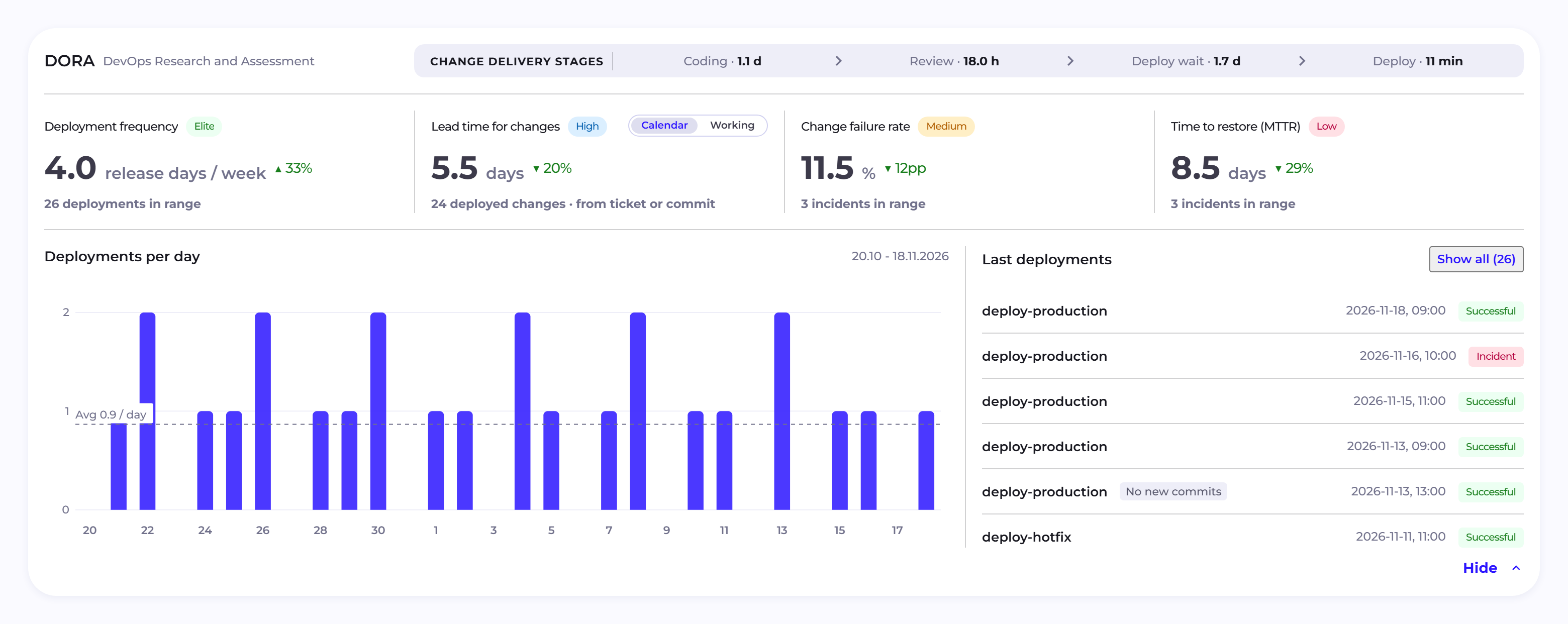
Before you start the DORA metrics, you need to download and install the latest version of Enterprise Plugin (2.8.7) and configure the feature. An administrator does the configuration: they turn on the "DORA metrics for this organization" toggle in the "DORA metrics" section (Manage Organization → Configuration) and specify the production environments. In the same section they can optionally set how to recognize repair deployments. They can also set how long after a deployment a failure is linked to it and from which moment lead time for changes is counted.
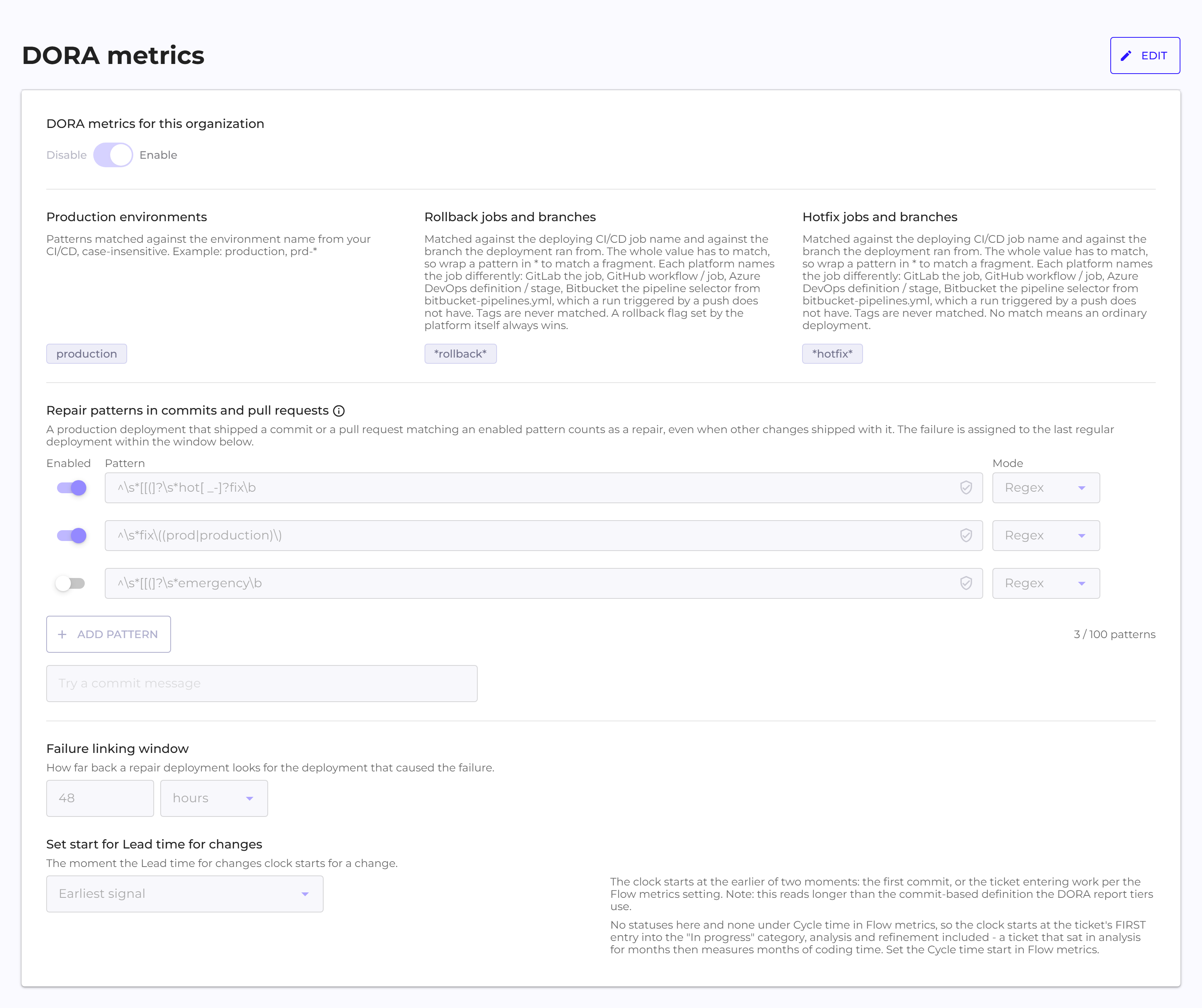
Environments, repair deployments and the start of the time count can be set separately for a single project. You do this in the project's "DORA metrics" tab (Manage Organization → Projects).
Smart Account Management
A person who uses several source systems (for example Jira and GitLab) often has a different email address in each of them. Until now, their accounts had to be merged in Q247 manually, as aliases. The new feature helps keep the organization's accounts in order.
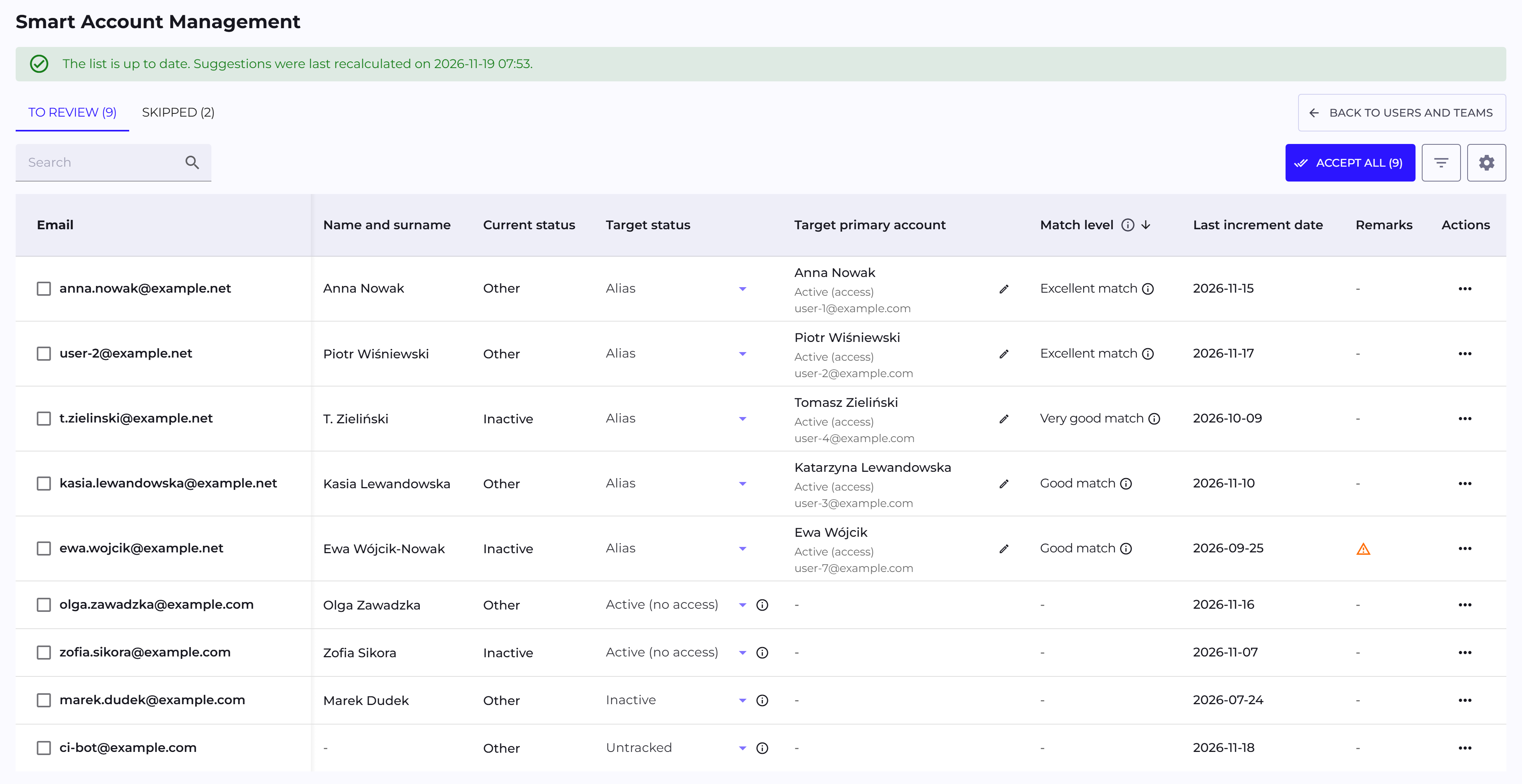
Q247 analyzes the accounts and suggests which to merge as aliases of one person. It also suggests changing the account status to Active (no access), Inactive or Untracked. Alias suggestions have a match level: Excellent, Very good or Good.
An administrator reviews the suggestions with the "Smart Account Management" button in the Users And Teams view. They can accept, correct, skip or reject each suggestion. The "Accept All" option applies many suggestions at once, after a preview. Suggestions marked with a remark wait for the administrator's decision. The feature is available to organization administrators.
Automatic application of account suggestions
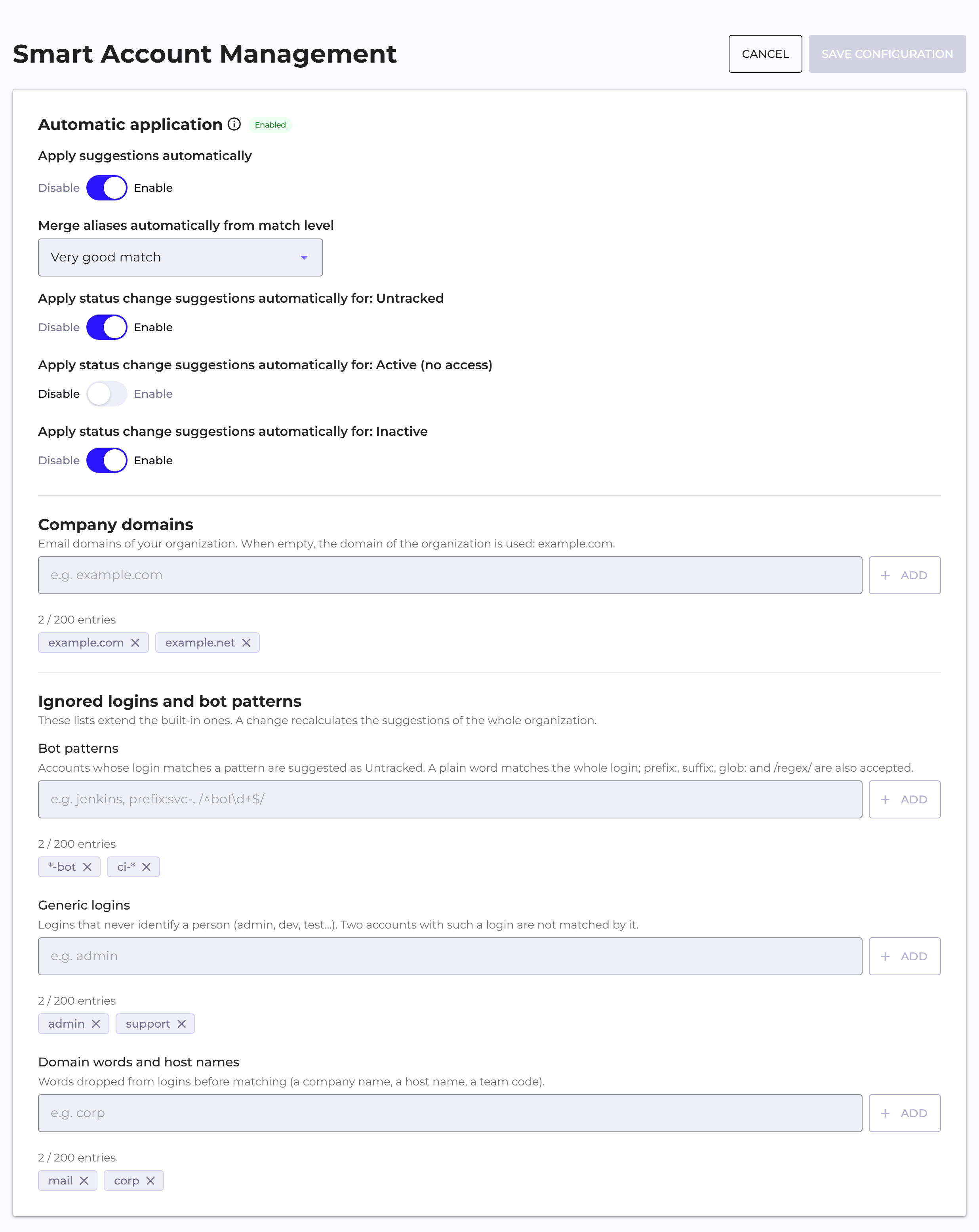
Matching Smart Account Management suggestions can be applied automatically once a day, at night. An administrator turns this on with the "Apply suggestions automatically" toggle in the "Smart Account Management" section of Configuration. There they choose the lowest match level for aliases and the kinds of status changes the automation may make. The default settings include all match levels and all kinds of status changes.
Before saving, Q247 shows how many pending suggestions will be applied immediately after the save. The automation skips suggestions with remarks and skipped suggestions. Changes made by the automation have an "Auto" marker in the Users And Teams view. You can filter them by this marker. Automatic application is turned off by default.
Enterprise Plugin: automatic restart and operation behind a reverse proxy
Enterprise Plugin 2.8.7 can be run as a systemd system service. The service resumes the plugin's work after a process crash. In Docker and Kubernetes environments, the platform itself provides the restart.
The plugin also works in networks where the SCM server is reachable through a reverse proxy. This applies to servers installed at the customer's site: GitLab, GitHub Enterprise Server, Bitbucket Data Center and Azure DevOps Server. In the connector, you only need to enter the address at which the server is reachable through the proxy. The plugin clones repositories from this address first. If that fails, it uses the address returned by the SCM system.
Improvements
Search and filters in tables
The "Search" field in tables ignores letter case and Polish diacritics, and skips extra spaces. A query of several words finds rows that contain each of them, also in different columns. Advanced filters in the Users And Teams view suggest values from the whole organization. In tables with row selection, the "Selected" counter adds up the selection from consecutive pages of the table.
Minor interface fixes
The AI Adoption panel is easier to read: the chart for a single day draws a line, bars with small values are visible, and the metric tiles have clearer labels. Charts show the points on their edges in full. Truncated texts have a tooltip with the full content. The same person has the same name in the legend of the Delivery tracker and in the commit details.
The fixes also covered the Flow distribution categories, toggles in Configuration, Polish messages about the time zone and about a rejected GitLab token, quotation marks in the Polish version of the interface, and commit links in Bitbucket Cloud. The key field in additional rules now accepts a comma-separated list of keys.
Performance and Stability
Faster chart loading
The AI Adoption panel, the Delivery tracker and Workload open faster, also in large organizations and for a range covering a whole year. Charts on the participant page also load faster.
Manual account unblocking
An account unblocked manually by an administrator, for example with the "Set as active (access)" option, does not go back to being blocked at the next automatic check of inactive accounts. The inactivity period is counted from the moment of unblocking.
Lower memory and network usage by Enterprise Plugin
Enterprise Plugin 2.8.7 optimizes when repositories are fetched. It checks for changes in the background and skips fetching a repository in which it detects none. This reduces network traffic. With a large number of repositories, the plugin uses less memory, and it retries a failed connection to Q247 with a limit on attempts.