Version v2.7.2

Version 2.7.2 extends the detection of commits that repeat work already counted. Q247 now also recognizes squash commits, manually reverted changes, and cherry-picks and rebases where the copy has a different author or date than the original. These commits can be excluded from statistics, so the same work is not counted twice. We are also starting to collect deployment data from CI/CD pipelines, which will be the basis for DORA metrics in the next release.
Below you will find a detailed description of the most important changes.
New Features
New detection methods for squash, cherry-pick and rebase
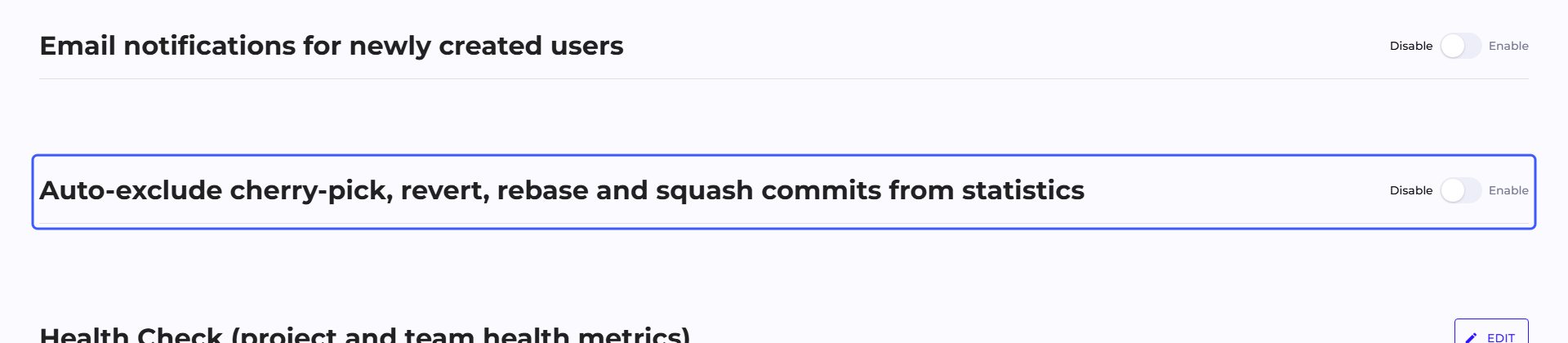
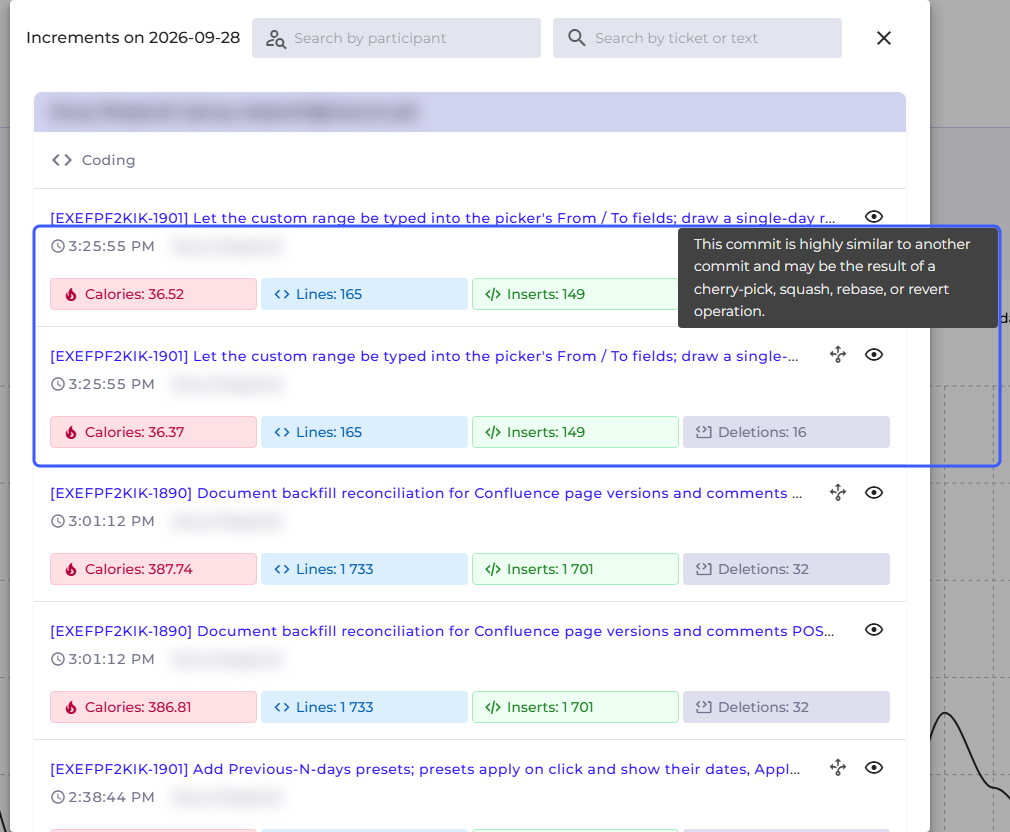
Q247 recognizes more commits that repeat work already counted elsewhere in the repository history. Two new methods have been added to the existing rules. The first compares the content of the change itself, so it detects cherry-picks and rebases even when the copy has a different author or date than the original. The second compares the content of the changed files and recognizes commits combined by squash, as well as changes reverted manually, without the git revert command. In the commit details window, such commits are marked with an icon showing the similarity to another commit. They are dropped from statistics once you turn on the "Auto-exclude cherry-pick, revert, rebase and squash commits from statistics" toggle in Configuration. The new methods compare commits pulled after the update, and in on-premise installations they require Enterprise Plugin 2.7.9.
Learn more: Recognition rules
Collecting data for DORA metrics
Q247 starts collecting deployment data from CI/CD pipelines: GitLab CI/CD, GitHub Actions, Azure DevOps Pipelines, and Bitbucket Pipelines in Bitbucket Cloud. In the next release, we will provide DORA metrics based on this data: deployment frequency, lead time for changes, change failure rate, and time to restore service. The data is pulled by the existing repository connectors, together with the deployment history from the last 365 days. For GitLab and a classic GitHub token, the current permissions are sufficient. Connectors for Azure DevOps, Bitbucket Cloud, and GitHub with a fine-grained token need a token with additional access to deployments and pipelines. On-premise installations require Enterprise Plugin 2.7.9 with the CICD module enabled in the configuration file, and the required permissions and the configuration file entry are described in the documentation.
Learn more: CI/CD deployments
Improvements
Lead Time and Cycle Time in the organization's working hours
Lead Time and Cycle Time now take into account the working hours and time zone from the organization's work calendar, and the result is given with the precision of a fraction of a business day, for example 2.4 days. Historical values will be recalculated after the update, so they may differ from the previous ones. Changing the working hours or the time zone in the calendar recalculates both metrics again.

Learn more: Business days
Confirmation when moving a repository to another project
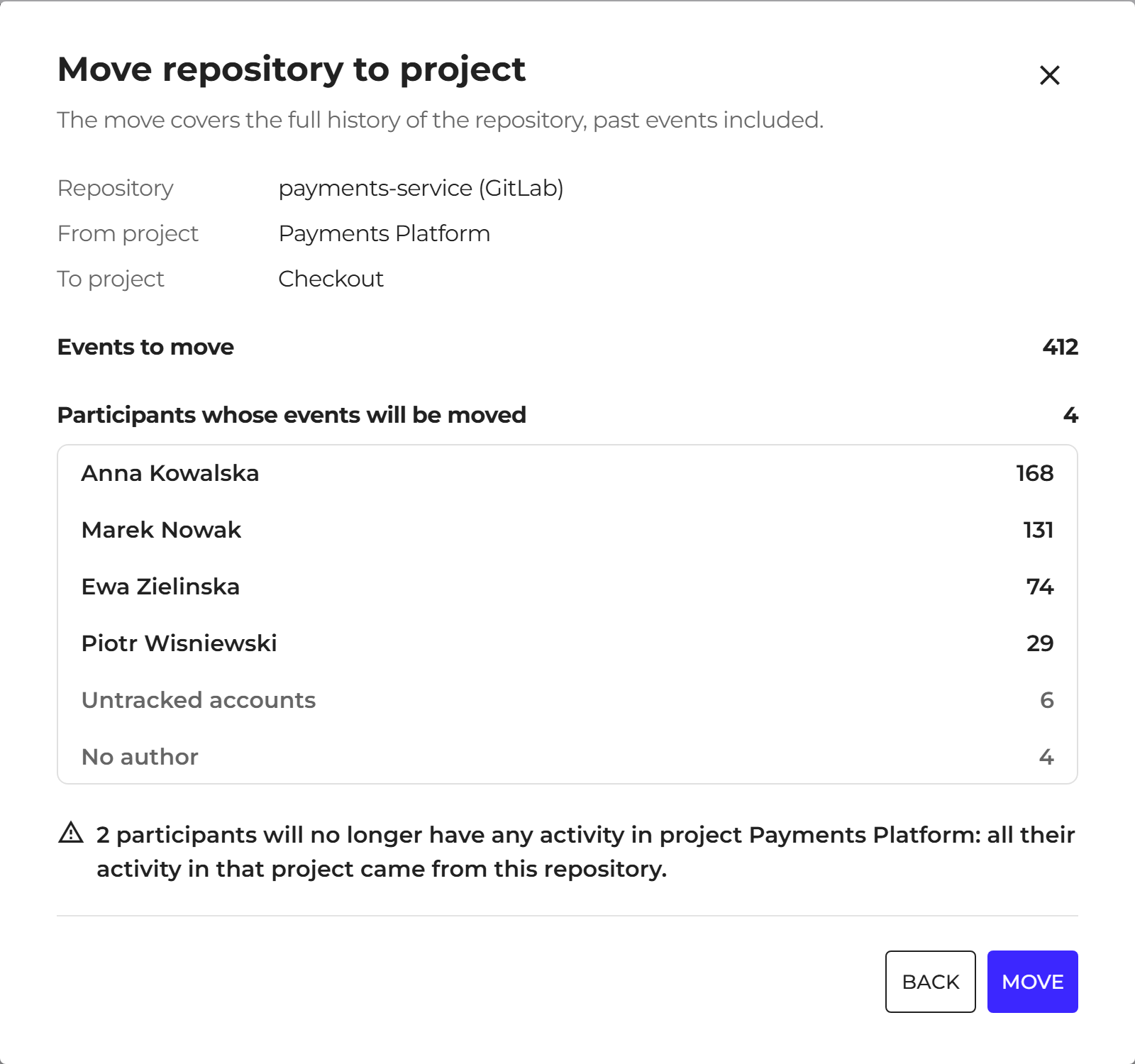
Assigning a repository to another project now requires confirmation in the "Move repository to project" window. The window shows the source and target project, the number of events being moved, and the participants who will have no activity in the previous project after the move. It appears on the Sources list, also for bulk moves, and in the project details when assigning a source.
Learn more: Moving a repository to another project
Interface and form fixes
- In the Jira and Confluence connector forms, together with the Tempo credentials section, the tooltips for project and space keys are now translated in the Polish interface.
- In the same forms, the "Optional" label remains only on the fields that can be skipped.
- The Cloud connector setup instructions lead to the right place on the Atlassian website.
- In the SCIM settings, the access group has one consistent name.
- Search in the commit details window returns to the top of the list.
- The "Customize table content" window, the toggles, and the loading indicator in the Retention module have a corrected layout and appearance.